Streaming TV advertising puts your video ads on the biggest screen in the house, with the targeting and reporting of digital.
Key Highlights
- Streaming TV advertising runs your ads inside apps people watch on smart TVs, streaming devices, and game consoles.
- You can buy streaming TV ads through self-serve publisher tools, a demand-side platform (DSP), direct deals, or curated private marketplace (PMP) deals.
- Most campaigns use 15- or 30-second non-skippable video, so creative needs to work full screen with sound on.
- Start with one clear KPI and a test budget, then scale what performs.
- Where your ads actually run matters as much as who you target, so check your supply before you scale.
Here’s how to advertise on streaming TV, from your first goal to your first report.
What Streaming TV Advertising Includes
Streaming TV advertising is any ad delivered inside internet-streamed content watched on a television.
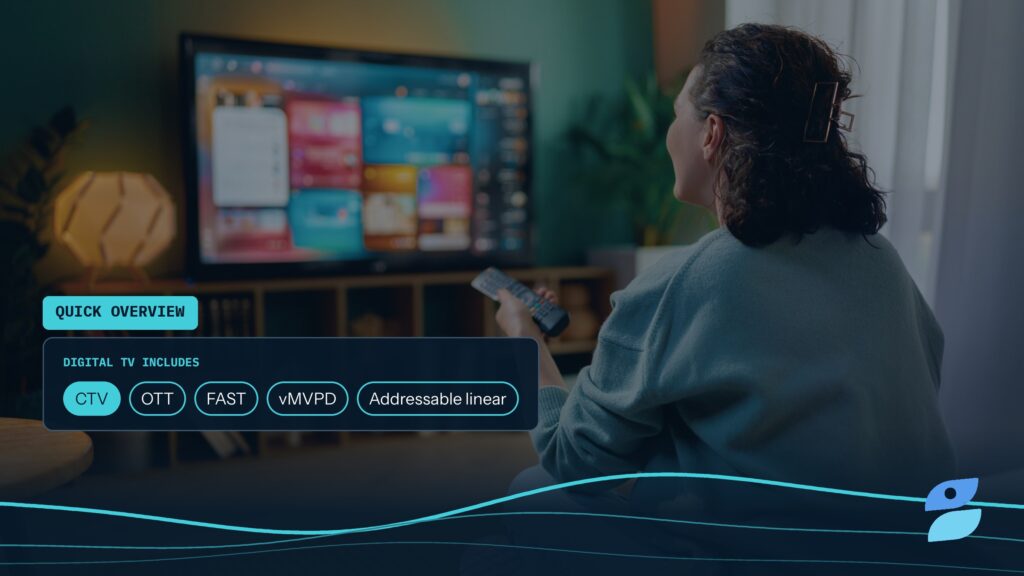
That covers ad-supported apps like Hulu, Peacock, Tubi, and Pluto TV, plus free ad-supported streaming TV (FAST) channels and live sports streams. It’s often called connected TV (CTV) advertising.
Streaming on phones and laptops falls under the wider over-the-top (OTT) category. Our OTT vs. CTV breakdown explains the difference, and our guide to AVOD, SVOD, TVOD, and FAST shows which streaming models carry ads.
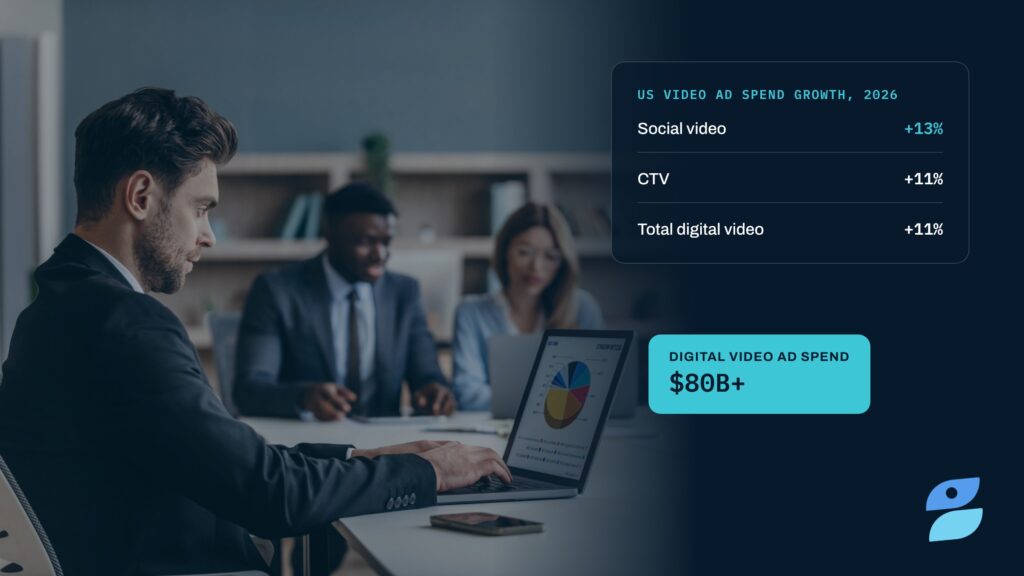
Budgets are following viewers here. The IAB’s 2026 digital video ad spend report projects US digital video ad spend will pass $80 billion this year.
Start With One Goal
Before you pick a platform, decide what the campaign has to do.
Awareness: reach as many households in your audience as possible, measured on reach, frequency, and completion rate.
Consideration: drive people to learn more, measured on site visits, QR code scans, or search lift.
Performance: drive sales or sign-ups, measured on conversions and cost per acquisition.
Pick one primary KPI. A campaign built for reach and judged on conversions will look like a failure even when it worked. Our guide to setting goals in CTV advertising walks through each option.
Choose How You’ll Buy
There are four main ways to advertise on streaming TV, and each trades control for convenience.
- Self-serve publisher tools: platforms like Roku Ads Manager let you buy one publisher’s inventory with a credit card and a small budget
- DSPs: buy across many apps and publishers from one interface, with your own audience data and frequency caps
- Direct deals: negotiate an insertion order with a publisher for guaranteed placements, usually with higher minimums
- Curated PMP deals: pre-packaged premium inventory from multiple sellers that you activate inside your existing DSP
If you’re testing streaming for the first time, a self-serve tool is the fastest start. If you already buy programmatic, a DSP with curated deals gives you scale and control without managing dozens of publisher relationships.
Define Your Audience
Streaming TV ads are bought by household, not by time slot.
That means you can target by geography down to zip code, by demographics, by interests and purchase behavior, or by your own first-party customer lists. You can also target by content, like live sports, news, or specific genres.
Start broader than you would on social. TV households are a smaller pool than mobile devices, and very narrow segments can limit delivery and raise costs. Our guide to CTV audience targeting covers each option in more detail.
Get Your Creative Ready
Most streaming TV ads are 15- or 30-second non-skippable spots that play before or during content.
A few rules make creative work on the big screen:
- Lead with the brand: show your logo or product in the first few seconds
- Design for sound on: viewers are listening, so voiceover and music carry the message
- Give a clear next step: a QR code or short URL works better than a “click” prompt
- Deliver to spec: most publishers ask for high-resolution video, and programmatic buys use VAST ad tags to serve it
Check each platform’s creative specs before you upload. Rejected files are one of the most common reasons first campaigns launch late.
Set a Starter Budget
Streaming TV ads are usually priced on a CPM, or cost per thousand impressions.
Your cost depends on the publisher, your targeting, the buying route, and the season. Premium apps and live sports cost more, and Q4 pushes prices up across the board. Our TV advertising costs guide breaks down what drives price.
For a first campaign, plan a test long enough to collect real data, often two to four weeks. Set a household frequency cap so the budget reaches new viewers instead of repeating the same ad. Then compare results on cost per completed view and reach, not CPM alone.
Measure What Matters
Streaming TV advertising gives you reporting that linear TV can’t.
Delivery metrics: impressions, reach, frequency, and video completion rate show whether the campaign ran as planned.
Outcome metrics: site visits, QR code scans, store visits, and conversions show whether it worked. Many DSPs and measurement partners match ad exposure to these actions at the household level.
Read results against the KPI you set at the start. Then shift budget toward the apps, audiences, and creative that performed best.
Check Where Your Ads Actually Run
The same CPM can buy very different impressions in streaming.
Some inventory sold as TV runs on phones, and some passes through several resellers, each taking a fee and adding fraud risk. Ask for app-level reporting, and favor short, direct supply paths. Our trader’s guide to supply path optimization shows how to tighten them.
That’s where we focus. Ichiro, our CTV curation platform, packages premium streaming inventory across SSPs into curated deals you activate in the DSP you already use. So more of your budget lands on real TV screens.
The Bottom Line
Getting started with streaming TV advertising comes down to a few clear decisions.
Set one goal, choose a buying route that fits your team, target broadly enough to deliver, and build creative for a full screen with sound on. Then test with a realistic budget, measure against your KPI, and hold your supply to a high standard as you scale.
Ready to plan your first streaming campaign? Talk to our team about curated streaming TV deals.
Frequently Asked Questions
How do I advertise on streaming TV?
Start by setting one goal and KPI, then choose how to buy: a self-serve publisher tool, a DSP, a direct deal, or curated PMP deals. Define your audience, produce a 15- or 30-second video built for the big screen, and set a test budget with a frequency cap. Measure results against your KPI and scale what works.
How much does streaming TV advertising cost?
Streaming TV advertising is usually priced on a CPM basis. Costs vary with the publisher, targeting, buying route, and season, with premium apps and live sports at the higher end. Self-serve tools let you start with small budgets, while direct deals often carry minimums. Compare options on cost per completed view and reach, not CPM alone.
Can small businesses advertise on streaming TV?
Yes. Self-serve tools from streaming publishers let small businesses launch campaigns with modest budgets and local targeting down to the zip code. The main requirements are a short video ad that meets the platform’s specs and a clear goal. Starting with a focused geographic area helps a smaller budget build enough frequency to make an impact.
What is the difference between streaming TV ads and traditional TV ads?
Traditional TV ads are bought by network, program, and time slot, and everyone watching sees the same spot. Streaming TV ads are delivered to individual households over the internet, so you can target by audience, location, and content. They also come with digital reporting on impressions, completion rates, and outcomes like site visits

Jake Gardner
The founder and CEO of Splash Bay Media, Jake has over 15 years of experience in digital marketing and ad tech. He’s built, scaled, and exited high-performance teams, products, and data-driven solutions that help advertisers and media partners succeed in an increasingly complex digital landscape. At Splash Bay, he leads the company’s strategic vision and growth, focusing on innovative traffic-shaping solutions, advanced analytics, and transparent supply-path optimization to drive efficiency, performance, and scale. He works closely across marketing, sales, client services, product, and finance to ensure we deliver measurable results and long-term value for our clients.