Roku Ads Manager is the fastest way to get a TV ad live on Roku, but it’s built for a specific kind of buyer.
Key Highlights
- Roku Ads Manager is Roku’s self-serve platform for buying video ads across its streaming inventory
- Setup is simple: create an account, set a budget, choose an audience, and upload compliant creative
- Targeting runs on Roku’s first-party data, inside Roku’s ecosystem only
- It works well for testing and small budgets but doesn’t reach other CTV platforms
- Agencies scaling CTV usually move to programmatic, curated deals that reach Roku and beyond
Here’s a practical walkthrough, plus where Ads Manager stops being the right tool.
What Is Roku Ads Manager?
Roku Ads Manager is Roku’s self-serve platform for buying connected TV (CTV) video ads without a dedicated sales rep.
It gives advertisers direct access to ad-supported content across the Roku platform, including The Roku Channel. You manage budgets, audiences, and creative from one dashboard.
Roku also sells through managed and programmatic channels. Ads Manager is the self-serve route, designed for brands and smaller agencies that want speed and control. Roku’s getting started guide for Ads Manager covers account basics.
How to Set Up a Roku Ads Manager Campaign
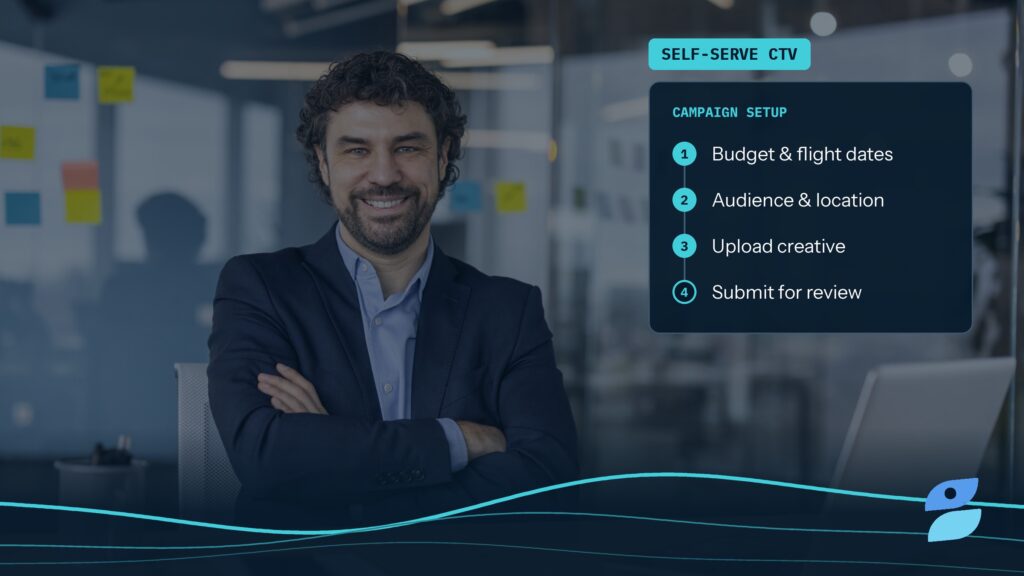
Getting a campaign live takes five steps.
Setup steps:
- Create an advertiser account and add a payment method
- Name the campaign and set a budget and flight dates
- Choose audience and location targeting
- Upload video creative that meets Roku’s specs
- Submit for review, since Roku checks every ad against its policies
Political advertisers face extra requirements. Review Roku’s political ads policy and our political advertising guide before you build.
Roku Ads Manager Targeting Options
Targeting inside Roku Ads Manager draws on Roku’s own first-party viewing and device data.
Common targeting levers:
- Audience segments based on demographics and interests
- Geographic targeting by market or region
- Content and genre preferences
Because the data stays inside Roku’s graph, measurement is consistent within the platform. The tradeoff is that your audience never extends past Roku. For a broader view of the mechanics, read how CTV audience targeting works.
Budgets and Campaign Best Practices
Self-serve doesn’t mean set-and-forget.
What tends to work:
- Start broad, then narrow once delivery stabilizes
- Use 15- or 30-second creative with a clear call to action and a QR code
- Cap frequency so the same household isn’t overexposed
- Define success metrics before launch, not after the first report
Our guide to setting goals in CTV advertising can help you pick the right ones. Check current spend minimums inside Ads Manager, since they can change.
Where Roku Ads Manager Stops
Ads Manager only sells Roku inventory, and that’s its biggest limit.
Viewers also watch on Samsung, LG, Vizio, Fire TV, and other platforms. A Roku-only buy can’t reach them, and it can’t manage frequency across them.
Reporting also lives inside Roku. So if your team plans across many CTV publishers, that siloed view gets harder to reconcile as budgets grow. Our connected TV advertising guide shows how a cross-platform plan fits together.
When to Move to Programmatic CTV
Most agencies outgrow single-platform self-serve once CTV becomes a core channel.
At that point, programmatic TV buying through a demand-side platform (DSP) gives you one seat across many publishers. That includes Roku supply available programmatically.
Our Ichiro curation platform makes the move cleaner. We curate CTV supply across supply-side platforms (SSPs), enrich bid requests, and package it into private marketplace (PMP) deals, including live sports. Your traders activate them in the DSP they already use.
The Bottom Line
Roku Ads Manager is a solid starting point for testing CTV on one large platform.
Use it to learn fast with a contained budget. However, once you need cross-platform reach, unified frequency, and cleaner supply, move to curated programmatic deals.
Book a meeting with our team to see how that looks in your DSP.
Frequently Asked Questions
Is Roku Ads Manager the same as Roku programmatic buying?
No. Roku Ads Manager is Roku’s self-serve interface, where you build and pay for campaigns directly with Roku. Programmatic buying happens through a demand-side platform (DSP), where Roku inventory is one of many supply sources. Ads Manager is simpler to start with, while programmatic gives you cross-publisher reach, unified frequency control, and reporting alongside your other CTV buys.
Can agencies use Roku Ads Manager?
Yes. Agencies can run client campaigns in Roku Ads Manager and manage access through organization and ad account user roles. It works well for testing and smaller budgets. For larger CTV programs, though, most agencies prefer buying through their DSP. That way Roku inventory sits alongside other publishers in one plan with consistent targeting, frequency, and reporting.
Does Roku Ads Manager reach viewers on other smart TVs?
No. Roku Ads Manager sells inventory within the Roku ecosystem, so it won’t reach viewers on other smart TV platforms or streaming devices. To reach households across platforms, buy CTV programmatically through a DSP. Ideally, use curated private marketplace (PMP) deals that combine supply from multiple publishers and SSPs into a single activation.

Jake Gardner
The founder and CEO of Splash Bay Media, Jake has over 15 years of experience in digital marketing and ad tech. He’s built, scaled, and exited high-performance teams, products, and data-driven solutions that help advertisers and media partners succeed in an increasingly complex digital landscape. At Splash Bay, he leads the company’s strategic vision and growth, focusing on innovative traffic-shaping solutions, advanced analytics, and transparent supply-path optimization to drive efficiency, performance, and scale. He works closely across marketing, sales, client services, product, and finance to ensure we deliver measurable results and long-term value for our clients.